Thursday, June 11, 2009

Lynnfield Beckons!


As we get nearer and nearer to the imminent Lynnfield (aka Core i5) launch, more and more leaked news and benchmarks are starting to hit the internet. So I thought it would be nice to track a timeline of the more significant milestones/news of this product since my team is partly working on it too :)


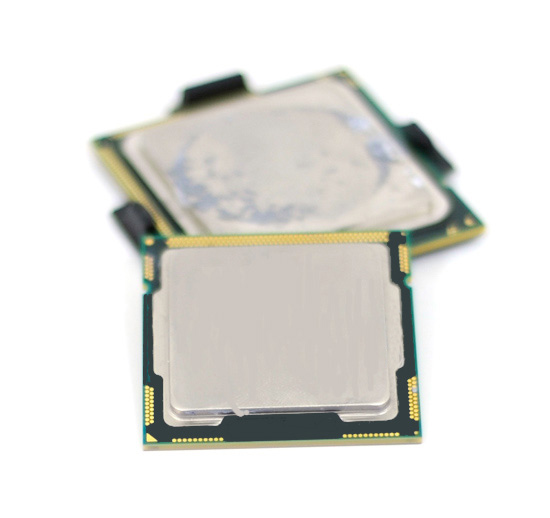
Last year in October 2008, a website released the first ever Lynnfield processor shots to the world. It compared the pin layout and substrate sizes between the 3 latest generations of Intel processors, the Yorkfield (Core 2), Bloomfield (Nehalem) and the Lynnfield (Nehalem) in a series of pictures. Technically, Lynnfield and Bloomfield share the same achitecture basics, but Lynnfield will be the first platform that will fully integrates the whole Northbride on die. In Bloomfield, only the memory controller portion was integrated and the Northbridge was still needed to handle the PCIE connections. Check out the pictures from here http://images.google.com/imgres?imgurl=http://xtreview.com/images/lynnfield-processor-LGA-1160-01.jpg&imgrefurl=http://xtreview.com/addcomment-id-6579-view-lynnfield-processor-vs-bloomfield.html&usg=__JgCpB503Pks4e02vcmqQZT6FFlk=&h=307&w=600&sz=50&hl=en&start=8&um=1&tbnid=TwElCOXEYBfu2M:&tbnh=69&tbnw=135&prev=/images%3Fq%3Dlynnfield%26hl%3Den%26sa%3DN%26um%3D1


Then I remembered when the first becnhmark on SuperPi, FRITz Chess, Cinebench and CPU score in 3DMarkVantage was released from some Chinese website showing a Lynnfield 2.13Ghz around December 2008. On every site that I visited, all cautioned againts using the numbers to conclude anything as the processor and the motherboard was still in its very early stages. Link to news: http://xtreview.com/addcomment-id-7237-view-Intel-Core-i5-Lynnfield-benchmark.html
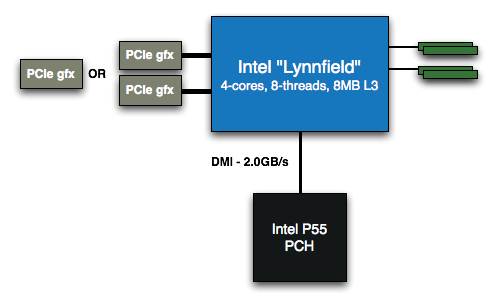


Only recently, Anandtech did a more comprehensive 11-page review with gaming benchmarks of a engineering sample with a not so complete Turbo Mode enabled. According to Anandtech, Lynnfield will have multiple Turbo Mode options based on how many cores are currently in used. When 3 cores are used, Lynnfield is able to shut down the extra core and divert the extra power to boost the 3 remaining cores for an extra 200Mhz. Thats great right? Wait, there's more. Moving to two cores, the same feature will boost the remaining two cores for 400Mhz and finally, at one core, an amazing 600Mhz increase in clock speeds! I like this feature alot.

Model NumberClock SpeedCores / ThreadsMaximum Single Core Turbo FrequencyTDPPrice
?2.93GHz4 / 83.60GHz95W$562
?2.80GHz4 / 83.46GHz95W$284
?2.66GHz4 / 43.20GHz95W$196


So if you games need raw processing speed, you get it with the Turbo Mode. Need multi core processing? No problem, Lynnfield has 4 cores to provide. You indeed get the best of both worlds with this processor. In short, we could say that Lynnfield will be the first CPU that is very optimized for both single threaded and multi threaded games.

Ofcourse then the next question is, how much will it cost? Anandtech also provided much valuable information about the Lynnfield's estimated position in the market and the launch prices for the different offerings

NameManufacturing ProcessCoresTarget MarketRelease
Gulftown32nm6High End Desktop1H 2010
Core i7 (Bloomfield)45nm4High End DesktopQ4 2008
Lynnfield45nm4Performance DesktopQ3 2009
Clarksfield45nm4High End MobileQ3 2009
Clarkdale32nm2Mainstream DesktopQ4 2009
Arrandale32nm2MobileQ4 2009

ProcessorPrice
Intel Core i7-940 (2.93GHz)$562
Intel Lynnfield 2.93GHz$562
Intel Core i7-920 (2.66GHz)$284
Intel Lynnfield 2.80GHz$284
Intel Lynnfield 2.66GHz$196
Intel Core 2 Quad Q9650 (3.00GHz)$316
Intel Core 2 Quad Q9550 (2.83GHz)$266
Intel Core 2 Quad Q9400 (2.66GHz)$213
Intel Core 2 Quad Q8400 (2.66GHz)$183
Intel Core 2 Quad Q8200 (2.33GHz)$163

Interestingly, Intel decides to sell the lowest end Lynnfield part (2.66Ghz) with HyperThreading disabled. I think this is partly due to it being priced lower than the i7-920 because with the Turbo Mode of the Lynnfield, the performance will easily beat the 920 thus there is no reason for end-users to purchase the higher-priced i7-920 then. The same goes for the i7-940 as the aggressive Turbo Mode will blow the i7 out of competition anyways. The only advantage the i7 has left is if the user is looking for high memory bandwidth and triple channel memory as well as full x16 dual PCIE lanes

However, there are also rumours that Intel might withdraw the lower i7-920 totally in order to draw a proper line between it's high-end and mainstream products. This is actually very bad news for fans of the i7-920 as this part has been one of the most overclockable processor especially with the D0 stepping, easily surpassing the 4Ghz mark. If Intel indeed withdraws it, fans of the high-end market will have to settle with higher priced i7-965s and 975s. If you've been thinking of building a i7 PC for awhile now, better do it sooner than later.

Anandtech also introduced one of the early CPU cooling offering from Thermaltake for the Lynnfield processors, the Thermaltake Spin-Q. I think anybody that eventually buys this should keep a few plasters in hand during installation lol.
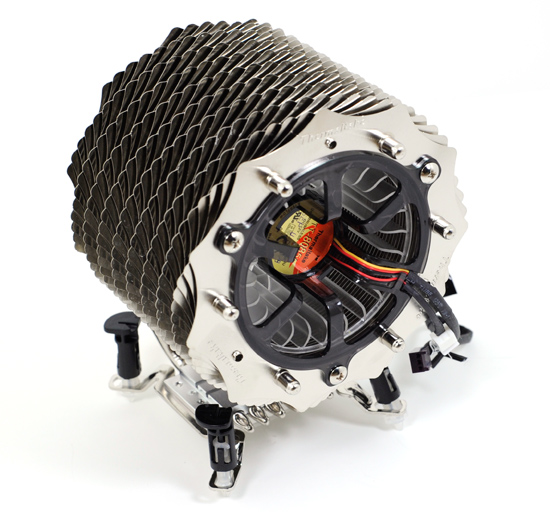

Since Lynnfield is going to use a different LGA 1156 socket, you will not be able to re-use existing Bloomfield coolers due to the difference in the motherboard socket hole widths. However, the Thermaltake solution above comes with adjustable push pin position making it suitable for both Lynnfield and Bloomfield motherboards. But if you ask me, push pins are a nightmare to work with. Gimme screws and springs anyday.

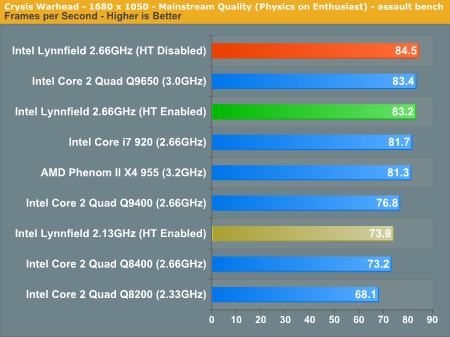
The gaming benchmark shows that the Lynnfield is pretty much on par with a i7 at the same frequency and even leads it in some games. This was all with a crippled Turbo Mode unit that Anandtech was using. It will be very surprising that Lynnfield should not be able to extend that lead further when retail units start shipping with fully functional Turbo Modes. Crysis bechmark below:

Anyways, there are more pictures and plenty more additional info from the full review. Check it out at http://www.anandtech.com/cpuchipsets/showdoc.aspx?i=3570&p=1
I especially liked their closing statement : "Penryn was always good, Bloomfield was nice to talk about but Lynnfield may end up being the one you marry." :P

And in the recent Computex, one slide from Intel pretty much sums up the performance of Lynnfield compared to my current QX9650 processor:


Computex also became the place where motherboard manufacturers were showing off their brand new P55 motherboards that will support the Lynnfield processors. Amongts the usual suspects are the Asus, Gigabyte, MSI, Foxconn, Asrock & DFI. Take a look at Gigabyte's new board! I can only wonder how many PWM phases its packing for its power supply around the CPU.


And finally, one of the news that I just read about today. Some Taiwanese motherboard company (guess who?) has reportedly stated that the Lynnfield processors will be a absolute dream to overclock. It seems early samples sent to them was able to hit 5Ghz....on air cooling!
Though this might just be rumours, but it's sure adding more hype to this potentially exciting product. Read the short article at http://www.bit-tech.net/news/hardware/2009/06/03/lynnfield-overclocks-to-5ghz/1

Let's see if Lynnfield will really take the world by storm. What do you all think?

Wednesday, June 10, 2009

How much electricity are you really using?


Have you guys ever wondered how efficient is your PC? 

When I started to get into overclocking and gaming, I was happily increasing my voltage to hit that satisfying 4.0Ghz speed. Seeing the 3DMark06 score jump by 400 points after overclocking my 8800GT was really exciting. Gained 4 fps in Crysis and I was already the happiest guy for the day.
Until the electricity bill came of course.

I never actually considered how much power my PC would be using but I bet the hours of Priming I did must have contributed something to it. So now I'm in a dillema. On one hand, I already have my system water cooled and it's begging to be overclocked but on the other, get nagged everyday by my mom for the increased electricity bill. Not a nice place to be at all.

So I went about to find some sort of measuring device so I could divert my mom's attention and hopefully able to blame some other faulty thing for the high electricity so she would leave me alone to continue OC my system hehe. It took me pretty long time and I just could not find any sold in PG or in Malaysia. Of course there are those so called plug-ins to the wall socket that supposedly able to cut down your electricity cost immediately but I chose not to trust these items partly also because it costs alot to find out if it works or not and that alone has already offset whatever savings you might be able to get from it.

Back to the topic, in US they have the pretty popular Kill-A-Watt (you can google it and you'll find many places selling them) but again, not offered here. There is also a problem of socket compatibility since the US pin layout is different. You would need a converter for the device and another for your application to plug into the device. Inconvinient and bulky I would think. To cut the story short, I went to ebay and did some search and found a few different models from UK. Apparently the UK uses the same socket layout as us and that is a definate plus. It also supports the same current and frequency ratings as what TNB is supplying us with. So after thinking a moment (first time buying from ebay and from a seller so far away), clicked the buy button and got it over with. RM80 gone and I waited patiently for it to arrive.

So, item arrived today much to my relieve. It was actually small enough to fit into a sort-of envelope with some paddings inside. I did not take any pictures of the unboxing or packaging because I was just too excited to try it out hehe. There were 3 buttons on the device: "UP", "SET" & "FUNC". The first two supposedly allows you to set the time and program it to even calculate your power cost by providing it with the price per kWh and it will be able to do the rest. Anyways, I skipped all those fancy stuff and basically only used the "FUNC" button. Pressing it will toggle the display to switch thru the typical Voltage, Current and Power(Watts) value. On to the results then!

Make a guess. What do you think is the power draw of my system?
For those who do not know my system specs:

Intel QX9650 3Ghz
Foxconn X38A Motherboard
2x1GB Crucial Anniversary 800Mhz DDR2
Seagate 320GB 7200rpm HDD
Western Digital 640GB Caviar Green 7200rpm HDD
Galaxy 8800GT 512MB GDDR3
Samsung 19" LCD
CoolerMaster M620 620W PSU
Watercooling: Swiftech Apogee GT, Swiftech MCR320 (120.3 radiator) & Swiftech MCP655 Pump

I did the measurement with everything at stock and no OC on any parts.

I first turned on the mains. At this point, PC is powered up but not running yet, mobo lights and PSU lights are on.

9W! I think I could have powered half a Atom PC up already even before I powered up my PC. At this point, it's not looking good at all. I'm so going to be blamed for the electricity cost.

Next, bootup.

Hmm, it's not that bad @ 200W but still, assuming bootup should be around the idle state of the PC, I would assume then that full load when playing games would have to be higher than this

Move on then. I have now start-up my PC and have logged in to Windows. Even during the OS loading and everything, nothing much changed. I was still pretty much stucked at 200W. So I fired up a movie (Madagascar 2) to see what is the power consumption at during one of my movie sessions. To my surprise, it stayed at the 200W level maybe a occasional 2-3W spike now and then but it was still pretty good considering the increase of HDD activity as well as GPU usage. Hehe, no worries for movie sessions anymore!

Now to gaming! Started Left 4 Dead game and let it run its usual opening "2 weeks after initial infection" movie. Started the hospital campaign and this is what I got:

OK. So now we're seeing a slight increase to about 220W. Either L4D was a totally undemanding game or my GPU was handling the game very efficiently. Gaming is usually where we see the graphic card switch to the higher powered 3D mode to help out with all the 3D accelaration and the processor will also get out of it's sleep/idle state. So 20W is not a great increase at all. Good good.

But I just had to know. What is the absolute peak of my PC if it actually went that far. So I opened Prime95 and proceeded to torture test all 4 cores. The result was:

So this is the max draw of my PC. A constant 270W at peak loading (I can only imagine the hours I spend running Prime on it when I first overclocked it and how much power was been used up then :S). Anyways, this is with the CPU maxed out but I'm sure if I perhaps run an ATI tool to stress the GPU, we're maybe talking about 300W then.

Last test. I actually regularly leave my PC on throughout the night to complete my torrent. So just for an idea how much power I'm using that time I measured it with the LCD turned off (don't need it since I'm going to sleep right?)

176W. So my LCD is actually taking 30W of power to display.

So in conclusion, I can see that although the power used during torrent-ing is the lowest at 176W, it is also the one that I used the most. Leaving over night means the PC will be on for around 6-8hrs each time, everyday. Add that to my occasional gaming when I'm awake, we are talking about 185W+ per hour each day for 6-8hrs. That is a total of ~1.5kWh each day. For 1 month, thats 45kWh units of additional cost printed into your TNB bill. Using TNB's very own bill calculator (http://www.tnb.com.my/tnb/tariff/calc.htm), that is a huge total of RM9.80 per month. What?!

I think it's time for me to go back to the world of over clocking and let me find the unfortunate electrical appliance that I'm gonna put all the blame on haha! RM9.80 a month was not a very huge amount and definately not something I should be so worried about. Yay! :)


As always, appreciate the comments. Have a nice day!

Tuesday, June 9, 2009

SC's Build

My department has a habit of giving out 'free' Intel CPUs to it's employees for the purpose that we get to feel more connected to the products we work on (I so hope they will give out a Larrabee! Haha). We know it as the Beta Unit Program and this time, we are all getting Q9550 (2.8Ghz) Yorkfield processors. Great job hoh? (More like softening us up so that they can squeeze more life force from you everyday to do work haha)

One of my colleague, JG went down during the long weekend/Agong's Birthday public holiday to KL LowYat to help himself and another colleague pick up items for their PC build. He was planning to get the new Radeon 4770 card and plan to CF in the future and I thought he made a pretty good choice.

However, I did not know that LowYat traders practiced this kind of business attitude: He was told by X shop's person that they will not be selling new stock of the 4770s as it is affecting the other product's stock movement. He was then forced to get the alternative Radeon 4830. I mean, customers are getting forced to pay more for less performance here for the sake of profit. The 4770 they were selling was not exactly selling under priced at RM399 since AMD did launched the 4770 initially at USD109.99 or RM384 after all. What should have happened was they should have dropped the prices of the current cards since they do perform weaker to the 4770. I know doing business is not easy and every possible profit margin should be pursued but man I'm disappointed. Telling people the whole of LowYat not one single 4770. Just my two cents.

Anyways, I got the item and price list from JG, took a look, and was telling another colleague (SC) that was also interested to build his own PC with the beta unit that if he was OK, I could help him out to do his. SC agreed and I suggested to JG that once we were done (his was still missing the OS at the moment), we could do benchmarks to see which build ended up better just for the fun of it :P. Just throwing in a challenge to make things alittle bit more exciting (I could always cheat by OC-ing some parts hehe). Budget will be a RM1,500 total without keyboard/mouse/speakers/LCD. Windows 7 will be the OS.

Without delay, let me introduce the contenders *ding ding ding*

JG's Build
Gigabyte P45 UD3L Motherboard
2x2GB Kingston DDR2 800Mhz
Seagate 500GB 7200rpm Hard Disk
Sapphire 4830 512MB GDDR3

CoolerMaster 460W RealPower PSU
CoolerMaster ATX Casing (dunno which and have not seen it yet)
Stock shaped Intel LGA775 CPU cooler
LG 22x IDE DVD-RW

Total Price : RM1,520


SC's Build
Asus P5Q Pro P43 Motherboard
2x2GB Kingston DDR2 800Mhz
Western Digital Caviar Green 500GB 7200rpm Hard Disk
PowerColor 4770 512MB GDDR5 (PC Depot had stock!)
CoolerMaster 460W RealPower PSU
PowerLogic Quatro 200 Casing (Free 460W PSU but no 12V rail or 6pin for graphic card)
CoolerMaster X Dream4 LGA775 Cooler
Liteon 22X Sata DVD-RW
CoolerMaster 460W RealPower PSU

Total Price: RM1,478


OK, some reasons and comments on my choices. Mainly the difference between the two builds is the motherboard and graphic card. From the budget, it was pretty obvious that CF ready mobo is going to cost too much. A CF ready P45 mobo will cost aboout RM500 (cheapest was Asus P5Q Pro P45 for RM489 @ PCDepot) and you will then be forced to break the budget to get the 4770s. Since CF is out of the question, there is no point to get a P45 board anymore. A P43 board is basically a P45 board with 1 less PCIE x16 lane and is still equally as capable as the P45 in all other aspects. This allowed me to save about RM70 and it was then well placed into the more expensive but better performing 4770.

I also chosed ASUS due to the many motherboard feature it supported including it's Quick Boot feature that allows you to enter into a ASUS mini OS with internet browsing capabilities in 5secs! The Asus mobo also came with BIOS protection and offered alot of overclocking capabilities and settings.

On to the build! Counting this time, it would be my 4th time configuring and building a PC for me or someone else but this will be the first time I'm documenting it hehe. Hope I get this right and pardon for the blur photos. Took it with my Nokia 5800 cos too poor for DSLRs :(

The traditional lay-out-everything-on-the-floor-and-take-a-picture lol:


ASUS P5Q Pro P43 Motherboard. 6x SATA and 1 IDE cable. Too bad it's a brownish color for the PCB. Black would've been perfect but rare to find in midrange mobos. However, I did find a mATX with black PCB before. The ASUS P5KPL-AM, a pretty nice G31 board.

The new Radeon 4770

With the space ship designed cooler :S


It was pretty much a nice build. The casing was a big surprise. For the price of Rm105, it really felt well made and even the plastic front did not feel cheap. The paint job on the side panels was also very well done and the aluminium-like insides gave it a slightly classier look. At one point I was complaining to SC that this cheap casing does not even provide screws or PCB stands. We actually went on to impovised and screwed the mobo on anyways with whatever screws we could find until we saw the packet of screws/PCB stands tied together with the supplied power cable that came with the case (the casing comes with a PSU ready remember?). OMG!! Should've noticed that much earlier! Anyways, my apologies to the PowerLogic casing. sorry if I hurted your feelings. I will learn to respect cheap casings from now on haha.

Completed build:


The idle temp as seen from BIOS was about 55C which is a little too high if you ask me. Thinking to replace the exhaust fan with a 120mm, add a 120mm intake at the front and a 80mm at the side panel directly moving air towards the processor area. The pleasent surprise was the system was pretty quiet. The 4770 boots up with 100% fan speed and then lowers down to nearly an inaudible level after that. So far so good.

Since there is still the OS to install so stay tuned for the bechmark results much later. I'll probably run 3dMark Vantage and some game FRAPS and will try to post up by this week. I'll also do some cable tie management for the cables and post up a few more pics. It's still an ugly jungle right now. Do you think I made the correct choices? Let me know! :)

P.S. Thanks to SC for allowing me to spend his money for him. Hope you like your new PC!

Monday, June 8, 2009

Do you like framerates?


If you must absolutely have the greatest graphic solution ever at this moment? You want to see triple digits in Crysis? Too much electricity to spare? This is what you will want: ASUS Mars GTX295

The current reference GTX295 offered by NVidia is actually two GTX260x2 packed into a single card solution. This works well for people that do not have SLI capable motherboards or only have a single PCIE slot.

What ASUS has done here (risking the wrath of NVidia) is to take two GTX285 to create this monster. Yes, you read that correctly, two of the most powerful single card graphic cards available in the market currently.

We are talking about 4GB of GDDR3 goodness, 512bit memory bus and 240 shader processors. And if that is not good enough, this cards are SLI ready right off the bat which means Quad-SLI is very much supported. The card also works with current drivers. According to ASUS, it estimates the Mars to beat the reference GTX295 by a whopping 21%!

Check out the pics captured at the card's introduction in Computex 2009 recently.
There will be only a limited 1000 cards for sale and if you have some spare arms or legs, go for it. I can imagine the first time you turn on your PC, all your lights will start to flicker and the entire house starts to shake. It's afterall a card that is 'out of this world' :)


Sunday, June 7, 2009

StarCraft2, Bioshock 2 & Assasin's Creed 2!

Ooo...new game trailers has been released for this 3 popular games after the recently concluded E3 event!
I think StarCraft is going to be one of the biggest game for this year. Estimated to be released this September (many things happening in Sept it seems, Windows 7 & new Intel Lynnfield processor also slated for the same time)

Bioshock 2 this time, you're going to take the role of that Big Daddy that was a pain to kill in the original. Should be fun haha

Exciting year it should be. for those who haven't seen them, enjoy the trailers I've posted below (had to skip StarCraft 2 gameplay trailer due to size limitation..too bad but you can view them from http://www.gamespot.com/).

Bioshock 2

Assasin's Creed 2

HAF932 & Cosmos S Water Cooled

Since I'm planning to upgrade the water cooling of my HAF932 and also to do some interior case painting (the dull steel colour is starting to get to me), I was browsing around for ideas and inspiration and came across these stunning pictures. Probably some have seen this before, else enjoy :)

I especially like the dual loop color combination and contrast of the black interior in the Cosmos S
Anybody knows where to get that blue color coolant in Malaysia?


This will be more of what I will aim to do for my PC
I'm still considering either red or blue for my loop. Suggestions will be welcomed. I'm leaning more to blue currently

Best value for money graphic cards

I know for a fact the majority of the PC users these days do not go for the highest end graphic card they can find when they are making a new build. There are many of us that are looking for a solid card while not hurting our bank too much. Of course there are always those with deep pockets and are looking for bragging rights for the highest framerates possible in Crysis but I'll leave that for another topic. At the end of the day, both NVidia and AMD knows that the mainstream market is where the highest sales will be registered.

Note that although these cards are grouped in the mainstream market, I consider them to be of the higher mainstream portion as these cards can get you the magic 30 frames minimum in Crysis for 1280X1024 so do not underestimate them!

NVidia 8800GT 512MB

I did my first build in 2007. I bought the NVidia 8800GT card which was just launched at that time and I have yet to find a game I cannot play today at 1280X1024 with all high details with it. I remembered it costed me RM860 at that time. It was still considered a very good buy due to its price to performance ratio that no other card could beat. It was able to give nearly 8800GTX performance while priced 50% cheaper than it. It also consumed less power due to its new G92 core. At that time, you just could not ask for more.

Radeon 4850 512MB

Then we had the new Radeon 4800 cards, the Radeon 4850 and 4870. While the 4870 is still considered the high-end card (a new 1GB version has been introduced now) even till now, the 4850 was unchalleged as the new bang for buck champion. But the impact it made was not as impressive as when the 8800GT first launched. This was because the gains 4850 have over the 8800GT was not much after considereing the card is priced slightly higher that the 8800gt. It will make alot of difference only for new upgraders (from older hardware) or people looking for a new build as Crossfire was also a big factor to consider. SLI was proprietry to NVidia at that time and the efficiency of the Core 2 processors by Intel meant more people owned Intel motherboards that only support CF. You could consider the 4850 as the first card from AMD/ATI that could challenge the value for money previously held by NVidia.

Radeon 4770 512MB GDDR5

At present, we have a new attempt by AMD/ATI to hold on to the king of price vs performance crown from , the Radeon 4770. This is the world's first 40nm card combined with 512MB of very fast Qimonda GDDR5 memory (The only other card with GDDR5 is the 4870). The card has a memory bus of 128bits which is pretty low but compensation from the GDDR5's larger bandwidth compared to GDDR3s makes the actual bandwidth offered comparable to 256bit cards. The 4770 is targetted at the low cost HTPC market as well as the everyday gamer. It launched with a price of USD109.99 and can be found in LowYat for as low as RM350 each which is pretty awesome. The closest competitor from NVidia from pricepoint perspective is the 9600GT but there is actually no competition when looking at the benchmark results :). 

The 8800gt has sinced been refreshed as the current 9800GT with slightly better performance and the price has dropped 50% (you can easily find one for about RM400+ these days! OMG!!). The 4850s are also hovering in the RM400 price zones as well. As you can see, the economic situation does have an impact to the PC world. You can today get the same performance levels as 2 yrs back for 50% less cost. 

The 4770 performs generally between the 4850 and the new 9800GT(RM100 more expensive) with the 4850 at the front. But when overclocking comes into play, which is very much the forte of the 4770 due to its 40nm fab process and dual slot cooling (which I think is an overkill), it easily surges ahead of both the cards and even the 9800GTX at some games. However, cranking the resolution up to 1080p, it falls back to its place behind the higher memory equipped 9800GTX but still maintained its lead over the 4850 and 9800GT. AMD/ATI is doing really well!

Anybody wants to take my 8800GT? It has voltage mod jumpers :)
I want to get 2 of these in CF in my PC, water cool them and just push and push the core clocks