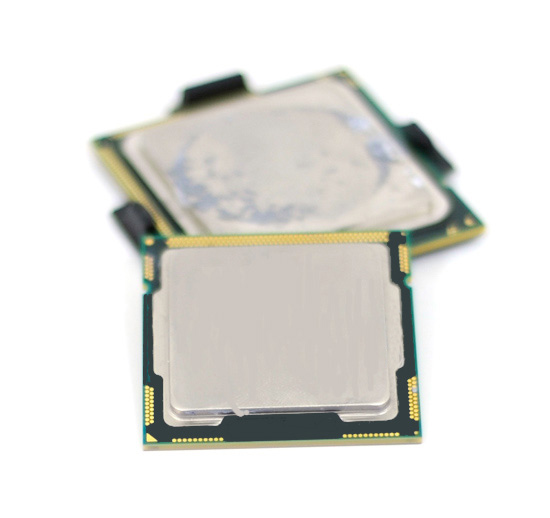
As we get nearer and nearer to the imminent Lynnfield (aka Core i5) launch, more and more leaked news and benchmarks are starting to hit the internet. So I thought it would be nice to track a timeline of the more significant milestones/news of this product since my team is partly working on it too :)

Last year in October 2008, a website released the first ever Lynnfield processor shots to the world. It compared the pin layout and substrate sizes between the 3 latest generations of Intel processors, the Yorkfield (Core 2), Bloomfield (Nehalem) and the Lynnfield (Nehalem) in a series of pictures. Technically, Lynnfield and Bloomfield share the same achitecture basics, but Lynnfield will be the first platform that will fully integrates the whole Northbride on die. In Bloomfield, only the memory controller portion was integrated and the Northbridge was still needed to handle the PCIE connections. Check out the pictures from here http://images.google.com/imgres?imgurl=http://xtreview.com/images/lynnfield-processor-LGA-1160-01.jpg&imgrefurl=http://xtreview.com/addcomment-id-6579-view-lynnfield-processor-vs-bloomfield.html&usg=__JgCpB503Pks4e02vcmqQZT6FFlk=&h=307&w=600&sz=50&hl=en&start=8&um=1&tbnid=TwElCOXEYBfu2M:&tbnh=69&tbnw=135&prev=/images%3Fq%3Dlynnfield%26hl%3Den%26sa%3DN%26um%3D1

Then I remembered when the first becnhmark on SuperPi, FRITz Chess, Cinebench and CPU score in 3DMarkVantage was released from some Chinese website showing a Lynnfield 2.13Ghz around December 2008. On every site that I visited, all cautioned againts using the numbers to conclude anything as the processor and the motherboard was still in its very early stages. Link to news: http://xtreview.com/addcomment-id-7237-view-Intel-Core-i5-Lynnfield-benchmark.html
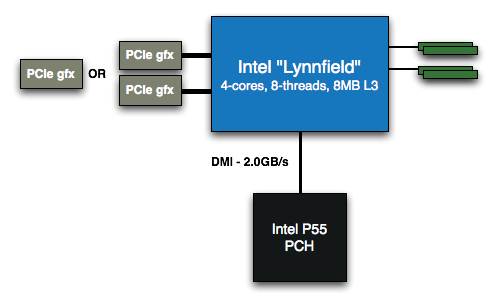
Only recently, Anandtech did a more comprehensive 11-page review with gaming benchmarks of a engineering sample with a not so complete Turbo Mode enabled. According to Anandtech, Lynnfield will have multiple Turbo Mode options based on how many cores are currently in used. When 3 cores are used, Lynnfield is able to shut down the extra core and divert the extra power to boost the 3 remaining cores for an extra 200Mhz. Thats great right? Wait, there's more. Moving to two cores, the same feature will boost the remaining two cores for 400Mhz and finally, at one core, an amazing 600Mhz increase in clock speeds! I like this feature alot.
| Model Number | Clock Speed | Cores / Threads | Maximum Single Core Turbo Frequency | TDP | Price |
| ? | 2.93GHz | 4 / 8 | 3.60GHz | 95W | $562 |
| ? | 2.80GHz | 4 / 8 | 3.46GHz | 95W | $284 |
| ? | 2.66GHz | 4 / 4 | 3.20GHz | 95W | $196 |
So if you games need raw processing speed, you get it with the Turbo Mode. Need multi core processing? No problem, Lynnfield has 4 cores to provide. You indeed get the best of both worlds with this processor. In short, we could say that Lynnfield will be the first CPU that is very optimized for both single threaded and multi threaded games.
Ofcourse then the next question is, how much will it cost? Anandtech also provided much valuable information about the Lynnfield's estimated position in the market and the launch prices for the different offerings
| Name | Manufacturing Process | Cores | Target Market | Release |
| Gulftown | 32nm | 6 | High End Desktop | 1H 2010 |
| Core i7 (Bloomfield) | 45nm | 4 | High End Desktop | Q4 2008 |
| Lynnfield | 45nm | 4 | Performance Desktop | Q3 2009 |
| Clarksfield | 45nm | 4 | High End Mobile | Q3 2009 |
| Clarkdale | 32nm | 2 | Mainstream Desktop | Q4 2009 |
| Arrandale | 32nm | 2 | Mobile | Q4 2009 |
| Processor | Price |
| Intel Core i7-940 (2.93GHz) | $562 |
| Intel Lynnfield 2.93GHz | $562 |
| Intel Core i7-920 (2.66GHz) | $284 |
| Intel Lynnfield 2.80GHz | $284 |
| Intel Lynnfield 2.66GHz | $196 |
| Intel Core 2 Quad Q9650 (3.00GHz) | $316 |
| Intel Core 2 Quad Q9550 (2.83GHz) | $266 |
| Intel Core 2 Quad Q9400 (2.66GHz) | $213 |
| Intel Core 2 Quad Q8400 (2.66GHz) | $183 |
| Intel Core 2 Quad Q8200 (2.33GHz) | $163 |
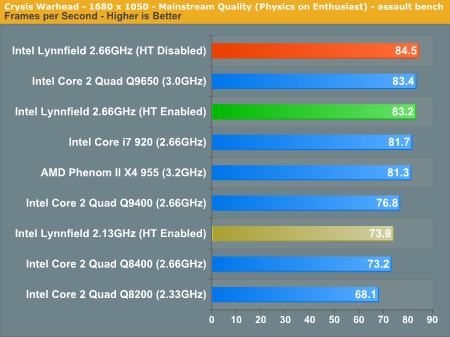
Interestingly, Intel decides to sell the lowest end Lynnfield part (2.66Ghz) with HyperThreading disabled. I think this is partly due to it being priced lower than the i7-920 because with the Turbo Mode of the Lynnfield, the performance will easily beat the 920 thus there is no reason for end-users to purchase the higher-priced i7-920 then. The same goes for the i7-940 as the aggressive Turbo Mode will blow the i7 out of competition anyways. The only advantage the i7 has left is if the user is looking for high memory bandwidth and triple channel memory as well as full x16 dual PCIE lanes
However, there are also rumours that Intel might withdraw the lower i7-920 totally in order to draw a proper line between it's high-end and mainstream products. This is actually very bad news for fans of the i7-920 as this part has been one of the most overclockable processor especially with the D0 stepping, easily surpassing the 4Ghz mark. If Intel indeed withdraws it, fans of the high-end market will have to settle with higher priced i7-965s and 975s. If you've been thinking of building a i7 PC for awhile now, better do it sooner than later.
Anandtech also introduced one of the early CPU cooling offering from Thermaltake for the Lynnfield processors, the Thermaltake Spin-Q. I think anybody that eventually buys this should keep a few plasters in hand during installation lol.
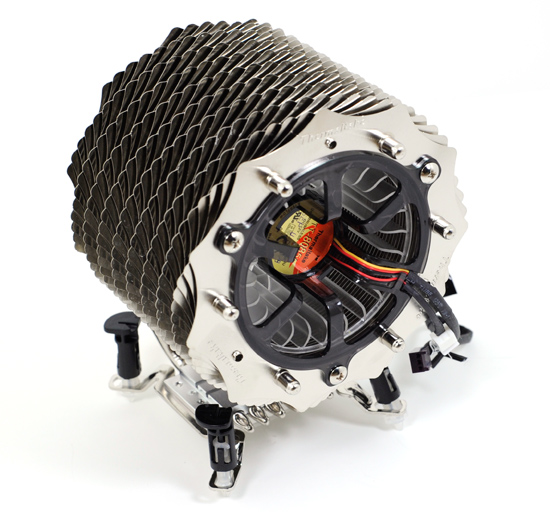
Since Lynnfield is going to use a different LGA 1156 socket, you will not be able to re-use existing Bloomfield coolers due to the difference in the motherboard socket hole widths. However, the Thermaltake solution above comes with adjustable push pin position making it suitable for both Lynnfield and Bloomfield motherboards. But if you ask me, push pins are a nightmare to work with. Gimme screws and springs anyday.
The gaming benchmark shows that the Lynnfield is pretty much on par with a i7 at the same frequency and even leads it in some games. This was all with a crippled Turbo Mode unit that Anandtech was using. It will be very surprising that Lynnfield should not be able to extend that lead further when retail units start shipping with fully functional Turbo Modes. Crysis bechmark below:
Anyways, there are more pictures and plenty more additional info from the full review. Check it out at http://www.anandtech.com/cpuchipsets/showdoc.aspx?i=3570&p=1
I especially liked their closing statement : "Penryn was always good, Bloomfield was nice to talk about but Lynnfield may end up being the one you marry." :P
And in the recent Computex, one slide from Intel pretty much sums up the performance of Lynnfield compared to my current QX9650 processor:

Computex also became the place where motherboard manufacturers were showing off their brand new P55 motherboards that will support the Lynnfield processors. Amongts the usual suspects are the Asus, Gigabyte, MSI, Foxconn, Asrock & DFI. Take a look at Gigabyte's new board! I can only wonder how many PWM phases its packing for its power supply around the CPU.


And finally, one of the news that I just read about today. Some Taiwanese motherboard company (guess who?) has reportedly stated that the Lynnfield processors will be a absolute dream to overclock. It seems early samples sent to them was able to hit 5Ghz....on air cooling!
Though this might just be rumours, but it's sure adding more hype to this potentially exciting product. Read the short article at http://www.bit-tech.net/news/hardware/2009/06/03/lynnfield-overclocks-to-5ghz/1
Let's see if Lynnfield will really take the world by storm. What do you all think?


